Recent Posts
- CFF Explorer 7.9 & Secunia
Fri, 13 Aug 2010
- IDAQ: The result of 7 months at Hex-Rays
Mon, 02 Aug 2010
- Rebel.NET & Phoenix Protector Update
Wed, 07 Jul 2010
- PDF Insider Demo
Tue, 25 May 2010
- CFF & Rebel.NET Update
Thu, 01 Apr 2010
 
Recent Comments
- Comment on IDAQ: The result of 7 months at Hex-Rays by Daniel Pistelli
Tue, 03 Aug 2010
- Comment on IDAQ: The result of 7 months at Hex-Rays by Malcolm
Tue, 03 Aug 2010
- Comment on IDAQ: The result of 7 months at Hex-Rays by Tweets that mention RCE Cafe » Blog Archive » IDAQ: The result of 7 months at Hex-Rays -- Topsy.com
Mon, 02 Aug 2010
- Comment on PDF Insider Demo by Marco
Mon, 26 Jul 2010
- Comment on Native Blocks Pre-Alpha by Breezer
Fri, 02 Jul 2010
 
VirtualReg Manager
Current Version: 1.0.0.1

Download VirtualReg Manager


VirtualReg Manager is a utility which creates virtual registry files and is also able to edit them through a regedit-like interface. It provides command line support for automation. Feel free to include this application in your freeware. Since it's a .NET assembly, it works on every Windows platform.

- VirtualReg Manager (Windows platforms)

The main form (VirtualReg Manager) of this tool provides the visual interface to create a virtual registry. This can also be achieved through command line, as we'll see later. One can decide whether to virtualize a key along with its subkeys or not.
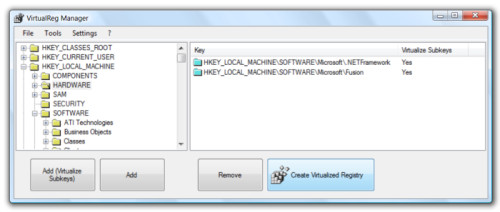

The virtual registry is an XML database. The format of this XML file looks like this:

<?xml version="1.0" encoding="utf-8"?>
<VIRTUALREG>
  <KEY Name="HKEY_LOCAL_MACHINE">
    <SUBKEYS>
      <KEY Name="SOFTWARE">
        <SUBKEYS>
          <KEY Name="Microsoft">
            <SUBKEYS>
              <KEY Name="Fusion">
                <VALUES>
                  <VALUE Name="ZapQuotaInKB" Type="REG_DWORD">F4240</VALUE>
                  <VALUE Name="DisableCacheViewer" Type="REG_BINARY">AQAQAA==</VALUE>
                  <VALUE Name="ForceLog" Type="REG_DWORD">1</VALUE>
                  <VALUE Name="LogPath" Type="REG_SZ">YwA6AFwAAAA=</VALUE>
                </VALUES>
                <SUBKEYS>
                  <KEY Name="GACChangeNotification">
                    <SUBKEYS>
                      <KEY Name="Default">
                        <VALUES>
                          <VALUE Name="Accessibility,1.0.5000.0,,b03f5f7f11d50a3a" Type="REG_BINARY">yEWDMkwyxgE=</VALUE>
                          <VALUE Name="cscompmgd,7.0.5000.0,,b03f5f7f11d50a3a" Type="REG_BINARY">ROfXLkwyxgE=</VALUE>
                          <VALUE Name="CustomMarshalers,1.0.5000.0,,b03f5f7f11d50a3a" Type="REG_BINARY">yEWDMkwyxgE=</VALUE>


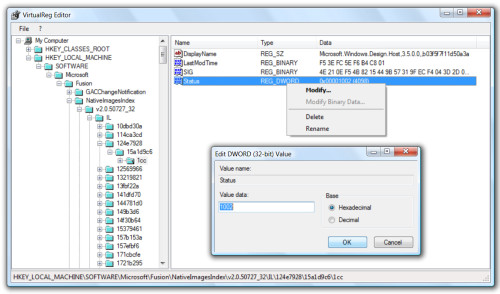
Numbers are stored in hex format, whereas all other data is base64 encoded. The virtual registry file can be edited with VirtualReg Editor (vregedit), which is very user-friendly as its interface is identical to regedit's one.


Creating a virtual registry from the GUI is okay for manual task, but tools can use the program's command line to generate a virtual registry. In order to do that, a ".tovreg" file has to be passed as command line to the program. A tovreg file has this syntax:

[OPTIONS]
output="c:\....\fusion.vreg"

[HKEY_CLASSES_ROOT\CLSID]

[HKEY_LOCAL_MACHINE\Software\Microsoft\Fusion]
subkeys=true


As you can see, it's a simply ini file. If the "subkeys" parameter is missing, then subkeys are not virtualized.

Download VirtualReg Manager